🎧 Usage Instructions
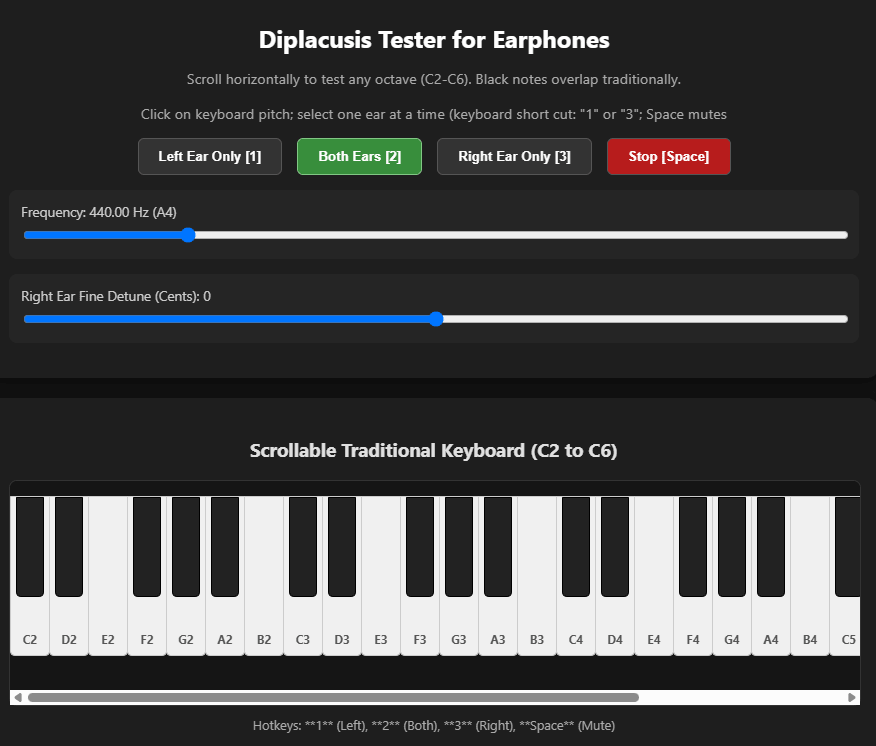
- Headphones Required: Always perform tests using quality stereo headphones. Computer or device ambient speakers will not work at all in isolating left vs right.
- The app assumes you either have skills for relative pitch or pitch matching/comparison. Diplacusis skewed perception can be very subtle, especially if distortions are introduced in the inner ear.
The just noticeable difference (JND) in pitch for human perception is typically around 3 to 10 cents
- Adjust the amplitude (volume) to a low, but comfortable level. For certain frequencies where there is hearing loss, you may have to boost the amplitude.
- Upon using the app for the first time, it is common to think the app is "wrong" - you're perceiving a different pitch between ears. Reverse your earphones to prove to yourself that L & R have the same pitch (of course, before you de-tune one ear).
- Determine through experimentation WHICH ear has Diplacusis. This app will likely be of no help if BOTH ears suffer from similar or differing modes of Diplacusis.
Suggested experiments: one ear at a time, "play" (click) notes various octaves apart and see if they sound like octaves. If you have good RELATIVE pitch, play other notes to see which ear perceives "logical" interval perception. Once a "good" reference ear is determined, toggle (if needed) the
TARGET button to display the "bad" ear-- this will be the ear affected by the de-tuning sliders, such that you can de-tune (or "correct"/compensate for the skew) that bad ear to now be the same perceived pitch. Often Diplacusis introduces distortions such that it is difficult to decide which harmonic is the fundamental (due to "neighboring" cilia in the cochlea firing (bending) to register perceiving that pitch).
- Trilling Shortcut: Use computer keyboard shortcut/hotkeys
1 (Left Ear Only) and 3 (Right Ear Only) to alternate between ears
-->"trill" typing 1 & 3 while adjusting the detune sliders until the perceived pitch matches.
press Space to stop audio playback
- The
Both (ears) button has limited usage other than to test the operation of your headphones. In fact, even tho Diplacusis, in and of itself, does not cause difference tones (beating) in your perception, using the
Both button WILL result in actual difference tones (beat frequencies/combination tones, or Tartini tones) in the earphones.
Binaural difference tones have been reported where the brain assimilates a phantom beat frequency internally when presented with slightly differing pitches in each ear - likely nothing to do with Diplacusis.
- Log Offset: Press
L or click Log Offset to record pitch skewmeasurements and subjective acoustic characteristics (amplitude drop, harmonics, unmatchable pitch).
The app produces pure tone fundamental sine waves (similar to a flute without its harmonics). Without diplacusis, the left vs. right comparison should be identical and not distorted.
- If you have difficulty discerning the pitch (amplitude is very soft, there are harmonics/distortions, or it's just not matchable/recognizable), tick one of the three checkboxes before moving on to clicking a next pitch to test. This will make a notation in the Skew log.
- Use the bottom horizontal slider to move the keyboard range to test additional pitches in other ranges.
- COPY will copy the logged skew deviations to your text clipboard. At a future date, we may offer a separate app to read the results and graph them in order to track the skew changes over time (typically every few months it will change).
- Close App: (Windows) Ctrl-W, or browse away from this web page.